
Ransomware is a type of malware that encrypts files or blocks access to systems, allowing attackers to demand payment from victims. It typically works through five stages: gaining initial access, establishing control, stealing data, encrypting files, and demanding ransom.
Imagine walking into your office, opening your laptop, and finding every single business document, customer record, and financial sheet permanently locked behind an unbreakable wall of encryption. This nightmare became a harsh reality for technology distributor Ingram Micro when a high-profile attack by the SafePay group paralyzed its distribution platforms across three continents, costing the company an estimated 1% to 1.5% of its quarterly sales.
Incidents like these show how ransomware has evolved from simple file-locking attacks into sophisticated cyber threats capable of disrupting entire organizations. Ransomware is a type of malware that encrypts data or blocks system access, often combined with data theft to increase pressure on victims.
Attackers commonly enter through phishing, stolen credentials, or security gaps. As ransomware groups adopt advanced tactics, businesses across industries face growing risks. This guide explains
According to Verizon Data Breach Investigations Report, ransomware appeared in 48% of analyzed data breaches, showing how frequently organizations face this threat.
What Is Ransomware?
Ransomware is a sophisticated form of malware that holds a victim’s digital assets hostage for financial gain. Ransomware relies on a psychological and operational chokehold: it weaponizes advanced mathematics to lock users out of their own systems.
Attackers typically deploy this ransomware malware through two primary methods:
- Crypto Ransomware: Encrypts critical data and files on the system, making them completely unreadable without a specific digital decryption key.
- Locker Ransomware: Bypasses individual files and completely locks the user out of the device’s operating system, blocking access to the entire interface.
Once the system is paralyzed, attackers leave a digital ransom note demanding a cryptocurrency payment in exchange for the decryption key. Today, hackers frequently use double extortion, stealing sensitive corporate data before locking it, and threatening to leak it publicly if the victim refuses to pay.
How Does Ransomware Work?
Ransomware is not a random malware infection that suddenly locks files. It follows a structured attack lifecycle where cybercriminals gain access, expand control, steal valuable information, encrypt systems, and demand payment.
Although ransomware families such as WannaCry, LockBit, Ryuk, and BlackCat (ALPHV) use different techniques, most modern attacks follow a similar five-stage process.
1. Initial Infiltration (The Breach)
Ransomware attacks begin when attackers gain unauthorized access to a system or network. Instead of directly deploying malware, they first identify weaknesses such as human errors, stolen credentials, exposed remote services, or unpatched software vulnerabilities.
Phishing Emails
Attackers use fake emails with malicious attachments, links, or login pages to trick employees into downloading malware or revealing credentials.
Common examples:
- Fake invoices
- HR documents
- Account alerts
- Delivery notifications
On May 12, 2017, the WannaCry ransomware worm spread to more than 200,000 computers in over 150 countries. Notable victims included FedEx, Honda, Nissan, and the UK’s National Health Service (NHS), the latter of which was forced to divert some of its ambulances to alternate hospitals.
Remote Desktop Protocol (RDP) Exploitation
Attackers target poorly secured RDP connections using stolen credentials, brute-force attempts, or compromised accounts to gain remote access and enter the network.
Organizations leave their default RDP ports (TCP 3389) open directly to the internet, allowing attackers to gain a foothold without needing any interaction from a user.
Software Vulnerability Exploitation
Unpatched software and security weaknesses allow attackers to bypass protections and gain access without requiring user interaction.
A notable example is the WannaCry ransomware attack (2017), where attackers exploited the EternalBlue vulnerability in Microsoft Windows systems to spread rapidly across networks.
2. Execution and Staging
After gaining access, attackers prepare the environment before launching ransomware. They spend time exploring the network, maintaining control, increasing privileges, and disabling security measures to maximize the impact of the attack.
During this stage, attackers typically:
- Establish Command and Control (C2)
Attackers connect compromised systems to C2 servers, allowing them to remotely manage infected devices, send commands, collect information, and prepare for further actions.
- Escalate Privileges
Attackers attempt to gain higher-level permissions to access critical systems and expand their control. With administrator access, they can disable security tools, access sensitive data, and spread ransomware across the network.
3. Lateral Movement and Data Exfiltration
After gaining access to an organization’s network, attackers expand their control and collect valuable information before launching encryption. Two key activities during this stage are lateral movement and data exfiltration.
Common Techniques Used During Lateral Movement and Data Exfiltration
| Technique | How Attackers Use It | Target |
| Credential Abuse | Use stolen usernames and passwords to access additional systems. | User accounts, servers |
| Remote Access Tools | Use legitimate remote tools to control devices within the network. | Workstations, IT systems |
| Network Discovery | Scan the environment to identify valuable systems and connected devices. | Servers, databases, backups |
| Sensitive Data Theft | Copy important information before encryption begins. | Customer data, financial records, research files |
4. Encryption
After gaining control of the network and stealing valuable data, attackers activate ransomware encryption to make files and systems inaccessible. Unlike protective encryption used for security, ransomware uses it to block access and demand payment for recovery.
How Encryption Works in a Ransomware Attack:
- Identifies Targets: Searches for important files, databases, and systems.
- Encrypts Data: Converts files into an unreadable format, preventing access.
- Blocks Recovery: Attempts to disable backups or recovery options.
- Displays Ransom Note: Shows payment instructions to restore access.
5. Ransom Note and Demand
After encrypting files, attackers display a ransom note informing victims that their data has been locked. The message typically includes payment instructions, ransom amount, deadlines, and threats of data exposure if demands are not met. This stage marks the attacker’s attempt to monetize the breach.
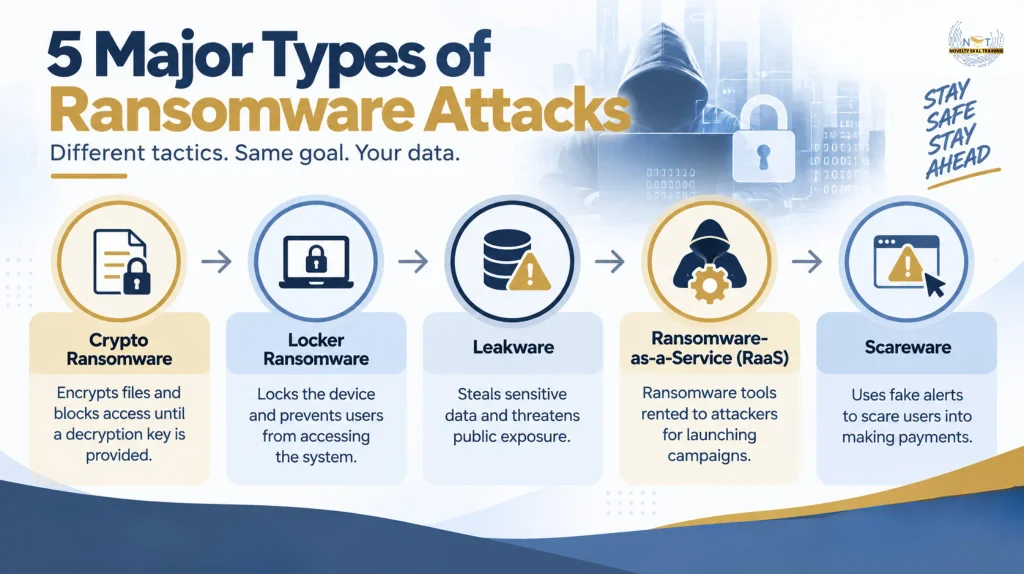
5 Major types of ransomware attacks People Should Know
Ransomware has evolved into different forms, with attackers using various techniques to target files, systems, and sensitive information. While some ransomware variants focus on encrypting data, others block access to devices or use stolen information as leverage.
The major types of ransomware include:
1. Crypto Ransomware (File Encryptors)
Crypto ransomware is the most common type of ransomware that focuses on encrypting a victim’s files and making them inaccessible. Once it enters a system, it searches for valuable data such as documents, databases, spreadsheets, and images, then encrypts them using complex encryption algorithms.
The victim’s computer may still turn on, but the encrypted files cannot be opened, modified, or used without the correct decryption key. Attackers then display a ransom note demanding payment in exchange for restoring access to the files.
Crypto ransomware can cause major disruptions for individuals and organizations by preventing access to critical data and affecting daily operations.
2. Locker Ransomware (System Lockers)
Locker ransomware is a type of ransomware that blocks users from accessing their entire device instead of encrypting individual files. It targets the operating system interface and prevents normal computer usage.
When infected, users may see a full-screen ransom message that prevents them from accessing the desktop, applications, or system controls. Although the files may remain intact, the victim cannot access them because the system itself is locked.
3. Leakware (Doxware / Double Extortion Ransomware)
Leakware is a ransomware technique where attackers steal sensitive information and threaten to release it publicly if the ransom is not paid.
Unlike traditional ransomware that only encrypts files, leakware adds another layer of pressure by exposing the risk of data leaks. Attackers may steal confidential information such as customer records, financial documents, medical data, or business files before encrypting systems.
This technique is commonly known as double extortion, because attackers combine data encryption with the threat of publishing stolen information. Even organizations with backups may face pressure because restoring systems does not prevent sensitive data from being leaked.
4. Ransomware-as-a-Service (RaaS)
Ransomware-as-a-Service (RaaS) is not a specific ransomware type but a cybercrime business model that allows criminals to rent ransomware tools from developers.
In this model, ransomware developers create and maintain malware platforms, while affiliates use these tools to carry out attacks. The profits generated from successful attacks are usually shared between the developers and affiliates.
RaaS has made ransomware attacks more accessible by allowing attackers with limited technical skills to launch sophisticated campaigns. This business model has contributed to the growth of organized ransomware groups targeting businesses worldwide.
5. Scareware
Scareware is a type of cyberattack that uses fear and deception to trick users into paying money or installing unnecessary software. Unlike crypto ransomware or locker ransomware, scareware usually does not encrypt files or lock the entire system.
Instead, victims receive fake warnings claiming that their device is infected, compromised, or involved in illegal activity. These alerts often appear as browser pop-ups or fake security notifications demanding immediate payment for a solution.
The main goal of scareware is psychological manipulation. Attackers create panic and urgency to convince users to share payment details or download malicious programs.
How to Prevent Ransomware Attacks: Tools and Technologies
To detect ransomware early, organizations use multiple security technologies that monitor file activity, user behaviour, network traffic, and system changes.
1. Next-Generation Antivirus (NGAV)
Traditional antivirus solutions mainly rely on known malware signatures to identify threats. However, ransomware attackers frequently modify their techniques to bypass signature-based detection. NGAV uses behavioural analysis and machine learning to identify suspicious activities, even when the malware variant is previously unknown.
| Traditional Anti-Virus Vs NGAV | |
| Traditional Anti-Virus | NGAV |
| Detects threats using known malware signatures | Identifies threats based on behaviour patterns |
| May struggle with new ransomware variants | Can detect unknown ransomware activity |
| Focuses mainly on malicious files | Monitors processes, applications, and system activity |
2. Anti-Ransomware Protection
Ransomware becomes most damaging when it starts encrypting files across a system. Anti-ransomware protection is designed to identify these encryption attempts and stop malicious processes before they affect critical data.
During an attack, it typically:
- Monitors File Activity
Tracks changes happening across files and folders to identify unusual behavior.
- Detects Encryption Patterns
Identifies rapid file modifications, unexpected extensions, or abnormal encryption activity.
- Blocks Malicious Processes
Stops the application or process responsible for unauthorized encryption.
- Protects Critical Data
Limits damage by preventing ransomware from spreading further.
3. Detection and Response Solutions for Ransomware
Ransomware attacks can involve compromised accounts, suspicious network activity, and malicious actions on devices. Different detection and response solutions focus on different parts of the attack surface.
| Solution | Primary Focus | Detects |
|---|---|---|
| EDR (Endpoint Detection and Response) | Monitors devices such as laptops, servers, and workstations | Suspicious processes, malware activity, unauthorized file changes |
| NDR (Network Detection and Response) | Monitors communication and activity across the network | Unusual traffic, suspicious connections, data movement |
| ITDR (Identity Threat Detection and Response) | Protects user identities and access controls | Stolen credentials, unusual logins, privilege escalation |
| MDR (Managed Detection and Response) | Adds human expertise to security monitoring | Investigates alerts, responds to threats, and supports containment |
Together, these solutions provide visibility across endpoints, networks, identities, and security operations, helping organizations detect and respond to ransomware threats earlier.
7. Backup Monitoring
Backup monitoring tracks backup systems to identify suspicious changes or attempts by attackers to remove recovery options.
It detects:
- Unexpected backup deletion
- Unauthorized backup changes
- Failed backup operations
Monitoring backups helps organizations maintain recovery options during ransomware incidents.
Conclusion
Ransomware has evolved from simple file-locking malware into a sophisticated cyber threat involving data theft, network compromise, and extortion. Attackers use multiple techniques, including phishing, stolen credentials, and software vulnerabilities, to gain access and disrupt critical operations.
Understanding how ransomware works, the different attack types, detection methods, and prevention strategies helps organizations build stronger defenses. By combining employee awareness, secure access controls, regular updates, advanced security monitoring, and reliable backups, businesses can reduce their risk and respond more effectively to ransomware threats.
FAQs
1. What is the meaning of ransomware?
Ransomware is malware that encrypts files or blocks systems, demanding payment to restore access.
2. What are some examples of ransomware?
Examples include WannaCry, LockBit, Ryuk, and CryptoLocker, which have targeted individuals and organizations worldwide.
3. How does ransomware infect a computer?
Ransomware spreads through phishing emails, stolen credentials, software vulnerabilities, malicious downloads, and exposed remote access services.
4. What is a ransomware removal tool?
A ransomware removal tool detects and removes malware but may not recover encrypted files.
5. Can ransomware be removed without paying the ransom?
Yes, ransomware can often be removed using security tools and backups without paying attackers.