Python projects for beginners help build practical coding skills through hands-on exercises such as calculators, games, weather apps, and web scrapers. These Python programming projects strengthen problem-solving abilities and prepare learners to develop real-world applications.
If you’re based in the UAE and want to move beyond reading tutorials to start writing functional code, building hands-on Python projects for beginners is a practical way to develop job-ready programming skills. With Python increasingly used across industries such as finance, healthcare, technology, and business analytics, learning the language can open doors to diverse career opportunities in the UAE. Its simple, English-like syntax and versatility make it suitable for beginners exploring Python programming projects. Whether you want to automate repetitive tasks, extract website data, or develop intelligent applications, these projects help you understand how Python is applied in real-world situations. From simple calculators and games to AI-powered applications, you can build practical solutions while strengthening your coding and problem-solving abilities.
This beginner-friendly nature has secured Python’s place as a dominant force in modern technology. According to recent market data, Python proudly commands 19.23% of the global programming language mindshare on the TIOBE Index, maintaining a comfortable lead as the world’s most popular language. This explosive growth is heavily driven by the artificial intelligence boom; recent ecosystem surveys show that global developer usage has surged by a massive 7 percentage points year-over-year, bringing total developer adoption to 57.9%. Furthermore, major employment portals like CoderPad report that 40% of recruiters worldwide actively list Python as a required core skill for software engineering, data, and automation roles. This growing demand makes Python practical projects a valuable way to gain hands-on experience, develop Python projects for portfolio, and prepare for real-world programming opportunities. Whether you are a beginner or exploring Python projects for freshers, now is a good time to move beyond tutorials and start building.
What You Need to Know Before Starting Python Projects for Beginners
Thinking about building your first Python project? You don’t need to be an expert programmer to get started. Exploring Python mini projects helps you understand basic programming concepts and apply them practically.
Whether you’re exploring Python project ideas for your first programming role or personal learning, understanding fundamental concepts and choosing the right tools will make your coding experience easier. Before getting started, learn the basics, set up your coding environment, and understand how to run Python programs.
Before you begin, let’s look at three things you should know.
1. Learn a Few Basic Python Concepts
You don’t have to learn everything about Python before starting a project. However, understanding four basic concepts will help you write, read, and modify code while working on Python practical projects.
- Variables: Think of variables as small boxes where you store information, such as your name, age, or a number.
- Loops: Loops help you repeat the same task multiple times without writing the same instructions repeatedly.
- Functions: Functions are reusable pieces of code that perform a particular task whenever you need them.
- Lists: Lists help you keep multiple items together, just like maintaining a shopping list with several products.
Having a basic understanding of these concepts will make it easier to follow project instructions, work with Python projects with source code, and eventually develop your own applications.
2. Choose a Code Editor to Write Your Python Code
Just like you use Microsoft Word to write documents, you need a code editor to write Python programs. It provides a space where you can type, edit, save, and run your code.
If you’re a beginner exploring Python mini projects, you can start with either of these two tools:
Visual Studio Code (VS Code)
A popular code editor that helps you write Python programs, identify mistakes, and manage your projects. It also offers useful features as you progress towards developing more advanced applications.
Thonny
A simple coding environment designed for people who are new to Python. Its easy-to-use interface makes writing and running your first program less complicated.
If this is your first experience with programming, Thonny is a good starting point. If you want to explore more coding features as you progress, VS Code is another great option.
Both tools can help you work on projects, organise your code, and gradually build Python projects for portfolio that demonstrate your practical programming abilities.
3. Know How to Open the Terminal or Command Prompt
Writing your Python code is only one part of the process. You also need a way to tell your computer to run that code. This is where the terminal or command prompt comes in.
It’s simply a window where you type commands to make your computer perform certain tasks.
Here’s how to open it:
- Windows: Click the Start menu, search for Command Prompt, and open it.
- macOS: Press Command + Space, type Terminal, and press Enter.
- Linux: Search for Terminal in your applications menu. On many systems, you can also use Ctrl + Alt + T.
Once it’s open, you can check whether Python is installed by typing:
python –version
For macOS and Linux, you may need:
python3 –version
To run a Python file, use:
python filename.py
On macOS and Linux, use python3 filename.py if that is the command configured on your system.
Understanding these commands will help you run your programs independently, test your code, and troubleshoot errors while developing projects. This is particularly useful if you’re exploring Python projects for freshers and preparing to demonstrate your coding skills.
Before You Move to Your First Project
Make sure you have these basics ready:
- A basic understanding of variables, loops, functions, and lists.
- Python installed on your computer.
- A code editor such as VS Code or Thonny.
- Knowledge of how to open the terminal or command prompt.
- An understanding of how to save a Python file with the .py extension.
That’s all you need to get started! You don’t have to know everything before writing your first program. Start with the basics, practice as you go, and learn something new with every project. As your confidence grows, you can gradually move towards more complex applications and expand your programming skills.
Python Projects for Beginners: Easy to Intermediate Ideas
Learning Python becomes easier when you start applying what you know to small, practical projects. Building Python projects for beginners helps you move beyond theoretical concepts and understand how Python is used to solve problems in real-world situations.
Whether you’re writing your first program or looking to improve your coding skills, exploring different Python project ideas can help you gain hands-on experience and understand how different programming concepts work together.
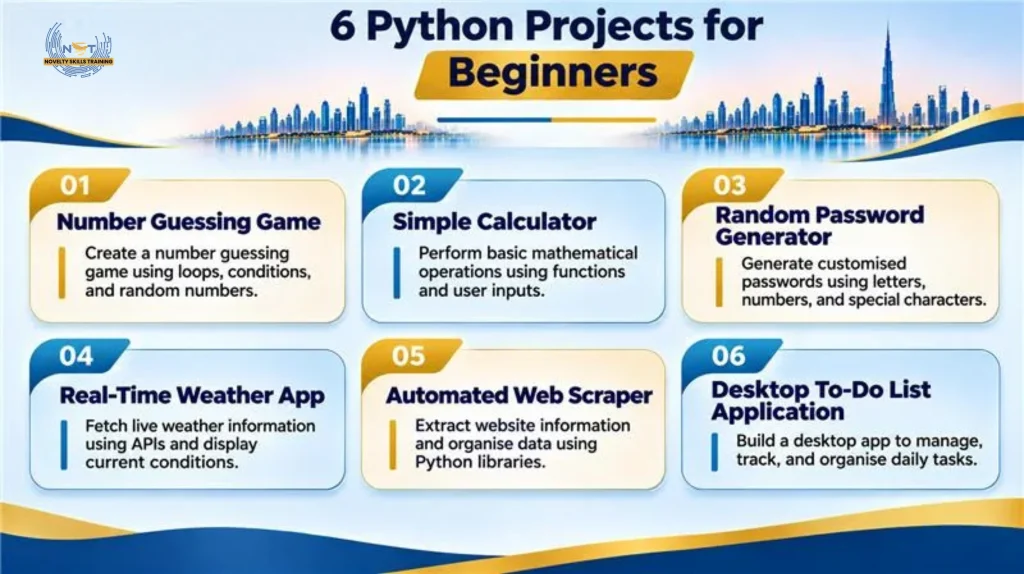
In this guide, we’ve covered six beginner-friendly projects, ranging from simple exercises to intermediate applications. These projects introduce you to different programming techniques and help you gradually develop practical coding skills.
- We’ve divided the projects into two levels based on their complexity:
- Tier 1 – Easy Python Projects: Simple projects that help absolute beginners understand basic programming concepts.
- Tier 2 – Intermediate Python Projects: Projects that introduce APIs, data extraction, and graphical user interfaces (GUIs).
Research on project-based learning in programming shows that over 90% of students report a positive or excellent learning experience when applying theory to hands-on tasks.
Tier 1: Easy Python Projects for Absolute Beginners (Text/CLI Based)
These Python mini projects are ideal if you’re new to programming. They focus on basic Python concepts such as loops, functions, user inputs, and string manipulation. You can build them without creating complex visual interfaces, making them a good starting point for developing practical coding skills —a step taken by the 52% of developers who actively acquire new coding skills each year.
Project 1: Number Guessing Game
A number guessing game is a fun way to understand how basic Python logic works. In this project, the computer randomly selects a number, and the player tries to guess it.
The program checks each guess and tells the player whether the number is too high, too low, or correct. The game continues until the player finds the right number.
What you’ll learn:
- Using while loops to repeat the game.
- Working with the random module to generate numbers.
- Taking input from users.
- Using conditional statements to compare guesses.
Python concepts involved: While Loops, Random Module, User Input, Conditional Statements.
Why try this project? This is one of the simplest Python projects for beginners to practise programming logic. It helps you understand how a program makes decisions and responds to user input.
Project 2: Simple Calculator
A simple calculator is one of the most useful Python programming projects for practising basic coding concepts. It allows users to enter two numbers and select an operation to perform.
The calculator can perform addition, subtraction, multiplication, and division before displaying the result.
What you’ll learn:
- Creating functions for different mathematical operations.
- Taking numbers and choices as user inputs.
- Using operators to perform calculations.
- Displaying results using output statements.
Python concepts involved: Functions, User Input, Arithmetic Operators, Conditional Statements.
Why try this project? It helps you understand how different functions work together to complete a task and provides a foundation for building more advanced applications.
Project 3: Random Password Generator
A random password generator creates passwords using a combination of letters, numbers, and special characters.
In this project, the user can choose the required password length, and the program generates a password based on the selected characters. This is a useful example of how Python practical projects can solve simple everyday problems.
What you’ll learn:
- Working with strings and characters.
- Combining letters, numbers, and symbols.
- Using the random module to select characters.
- Understanding string manipulation.
Python concepts involved: String Manipulation, Random Module, Loops, User Input.
Why try this project? It gives you practical experience working with text and character combinations while helping you understand how Python can generate customised outputs.
Tier 2: Intermediate Python Projects to Level Up Your Skills (APIs & GUIs)
Once you’re comfortable with basic Python programming, you can move on to projects that involve external data, automation, and graphical interfaces. These Python real-world projects introduce you to practical applications of the language and help you understand how different applications work beyond the command line.
Project 4: Real-Time Weather App
Have you ever checked the weather on your phone before planning your day? You can create a simple version of that using Python.
A weather app collects weather information for a selected location and displays details such as temperature, humidity, and weather conditions.
The project uses a weather API to retrieve current weather information from an external source. Learning APIs is a critical industry skill, 43% of fully API-first organizations generate more than 25% of total revenue from APIs, and 93% of API traffic relies on REST architectures.
What you’ll learn:
- Connecting Python to external APIs.
- Using the Requests library to retrieve information.
- Understanding API responses in JSON format.
- Extracting and displaying weather information.
- Handling connection errors and invalid locations.
Python concepts involved: Requests Library, APIs, JSON, User Input, Data Handling.
Why try this project?
It introduces you to how applications collect information from external sources and display updated data. It is also a useful starting point for exploring more advanced Python project ideas involving live data.
Project 5: Automated Web Scraper
Imagine having to collect product names, prices, or article titles from a website. Instead of copying each piece of information manually, you can use Python to automate the process.
A web scraper collects specific information from web pages and organises it into a readable format.
For example, you can create a scraper that extracts article titles and links from a website.
What you’ll learn:
- Understanding basic HTML structure.
- Using BeautifulSoup to find information on web pages.
- Extracting text, links, and other page elements.
- Working with website data.
- Organising extracted information.
Python concepts involved: BeautifulSoup, HTML Parsing, Data Extraction, Requests Library.
Why try this project?
It helps you understand how Python can automate repetitive data collection tasks and introduces you to techniques used in data extraction and web automation.
Project 6: Desktop To-Do List Application
A to-do list application helps users organise their daily activities in one place. Instead of maintaining tasks on paper, you can create a simple desktop application using Python.
The application allows users to add new tasks, view their task list, mark completed activities, and remove tasks they no longer need.
What you’ll learn:
- Creating graphical user interfaces using Tkinter.
- Adding buttons, text fields, and labels.
- Handling user actions and button clicks.
- Managing and updating task lists.
- Understanding how desktop applications work.
Python concepts involved: Tkinter, GUI Development, Functions, Lists, Event Handling.
Why try this project?
It helps you move beyond command-line programming and understand how to build applications that people can interact with visually. You can also expand its features as you gain experience, making it a useful addition to your collection of Python projects for portfolio.
What Do These Six Python Projects Help You Learn?
As you progress through these projects, you’ll gradually move from basic programming concepts to practical application development.
| Project | Main skill you’ll develop |
| Number Guessing Game | Programming logic and loops |
| Simple Calculator | Functions and calculations |
| Random Password Generator | String manipulation |
| Real-Time Weather App | APIs and data handling |
| Automated Web Scraper | Web data extraction |
| Desktop To-Do List | GUI development |
This will help you develop practical Python skills rather than simply copying code.
Tips to Get Started with Python Beginner Projects
Starting your first Python project can feel challenging, especially when you’re still learning how programming works. The best way to improve is to start small, practise regularly, and gradually take on more complex tasks. Here are eight practical tips to help you build confidence while working on Python projects for beginners.
1. Start with Small and Simple Projects
Begin with simple ideas such as calculators, number guessing games, or password generators. These Python mini projects help you understand basic programming concepts without feeling overwhelmed.
2. Understand the Code Instead of Just Copying It
Don’t simply copy code from tutorials. Understand what each instruction does, experiment with different inputs, and modify functions to explore how your program works.
3. Break Bigger Projects into Smaller Tasks
Divide complex applications into manageable steps. For example, when building a to-do list, work separately on adding tasks, displaying them, marking them complete, and deleting them.
4. Practise Regularly
Consistent practice helps you become comfortable with programming. Spend time writing code, experimenting with Python project ideas, and completing one project before moving to another.
5. Learn to Identify and Fix Errors
Errors are a normal part of programming. Learn to read error messages and identify issues such as spelling mistakes, incorrect indentation, or missing brackets. Debugging improves your problem-solving abilities.
6. Keep Your Code Simple and Organized
Use meaningful variable names, organize instructions, and avoid unnecessary repetition. Functions help divide programs into smaller sections, making your Python programming projects easier to maintain.
7. Try Adding Your Own Features
Once your project works, experiment with additional features, such as:
- Adding difficulty levels to guessing games.
- Including more operations in calculators.
- Allowing users to customize password settings.
- Adding categories to to-do lists.
These changes help you develop independent coding skills and create more personalized applications.
8. Save and Document Your Projects
Organize your projects into separate folders and create a README file describing their purpose, features, and requirements. Maintaining documentation helps you track your progress and showcase your work through Python projects for portfolio.
Conclusion
Building Python projects for beginners is a great way to move beyond theoretical knowledge and develop practical programming skills. However, to progress further, consistent practice and structured learning are essential. Upskilling in Python can help you explore opportunities in software development, data analytics, automation, and artificial intelligence.
If you’re looking to strengthen your programming skills, explore the Python Programming Course at Novelty Skills Training, Dubai. Gain practical coding experience, work on hands-on projects, and build the foundation needed to apply Python in real-world applications.
FAQs
1. How many Python projects should a beginner build to gain practical experience?
Start with 5–6 Python projects for beginners and gradually explore more complex applications as your skills improve.
2. Can I build Python projects without prior programming experience?
Yes. Start with basic Python concepts such as variables, loops, functions, and lists before attempting simple projects.
3. How can I make my Python projects suitable for a portfolio?
Include project descriptions, source code, features, and README files to demonstrate your practical programming abilities.
4. What tools do I need to build Python programming projects?
Install Python and choose a code editor such as VS Code or Thonny to write and execute programs.
5. Are Python AI projects for beginners suitable for freshers?
Yes. After learning Python fundamentals, freshers can explore beginner-friendly AI projects involving data processing and basic machine learning.
6. How can I improve my Python skills after completing beginner projects?
Explore API integration, web scraping, GUI development, and automation to build more advanced Python real-world projects.